Our test app, planted issues

demo-chat

Run 7 · Nov 2, 2026 · 9 min · 76 steps · 10 pages · Vite + React 19

It's a messaging app so my grandparents can text the family. It should feel calm and simple.

The owner’s brief

Found
48and 8 suggestions
Fixed and verified
0
Rolled back
0
Spent on models
$0.19360 calls

48 findings shown: 0 fixed and verified, 48 open.

No fixes in this run: it ended before any were approved. Fitts asks before it changes code.

What Fitts understood

I'm looking at a demo chat app for sending and reading personal messages. I've got an inbox, a Grandma thread, contacts, search, and settings for everyday messaging. It's built with Vite + React using a small custom router in src/router.tsx and plain CSS. I don't need a login, but I'll need seeded contacts and conversations to test. I see the core flow is a 3-step compose across /compose, /compose/recipient, and /compose/confirm.

From the code at commit 29896e25277e, read by a model.

Screens checked

Reflow · 320×640 iPhone · 390×844 iPhone landscape · 844×390 Laptop · 1280×800 Desktop · 1440×900 Text at 200% · 1280 wide Text spacing · 1280 wide

Tried 62 of 62 controls over 76 steps.

App Map

10 pages, grouped by address: what each does, what Fitts found there and what it fixed.

Findings

Shown because the evidence was strong enough: a measurement, or reviewers agreeing. Most serious first.

Sev 4 · Catastrophic H9 · Help users recognize, diagnose and recover from errors Usability Open: not fixed in this run

The page breaks when a request fails

On /compose, and 2 other pages: / /search · in src/App.tsx:14

/compose crashes (an uncaught error) when contacts fails.

The fix Fitts suggests: Catch the error and say what went wrong, with a way to try again.

Who flagged it

4 of 5 reviewers (Novice, Power user, Accessibility, Trust & ethics), and one of Fitts’s own measurements

What Fitts noticed

  • Noticed /compose crashes (an uncaught error) when contacts fails step 76 · /compose
  • Noticed / crashes (an uncaught error) when conversations fails step 76 · /
  • Noticed /search goes blank when search fails step 76 · /search

Evidence

  • /compose crashes (an uncaught error) when contacts fails (expected says what went wrong, with a way to try again)
  • / crashes (an uncaught error) when conversations fails (expected says what went wrong, with a way to try again)
  • /search goes blank when search fails (expected says what went wrong, with a way to try again)
  • /compose crashes (an uncaught error) when contacts fails
  • Empty white page in failure state

Sev 4 · Catastrophic H9 · Help users recognize, diagnose and recover from errors Content Open: not fixed in this run

No help when no contacts to choose

On /compose, and 1 other page: /contacts · in src/App.tsx:14

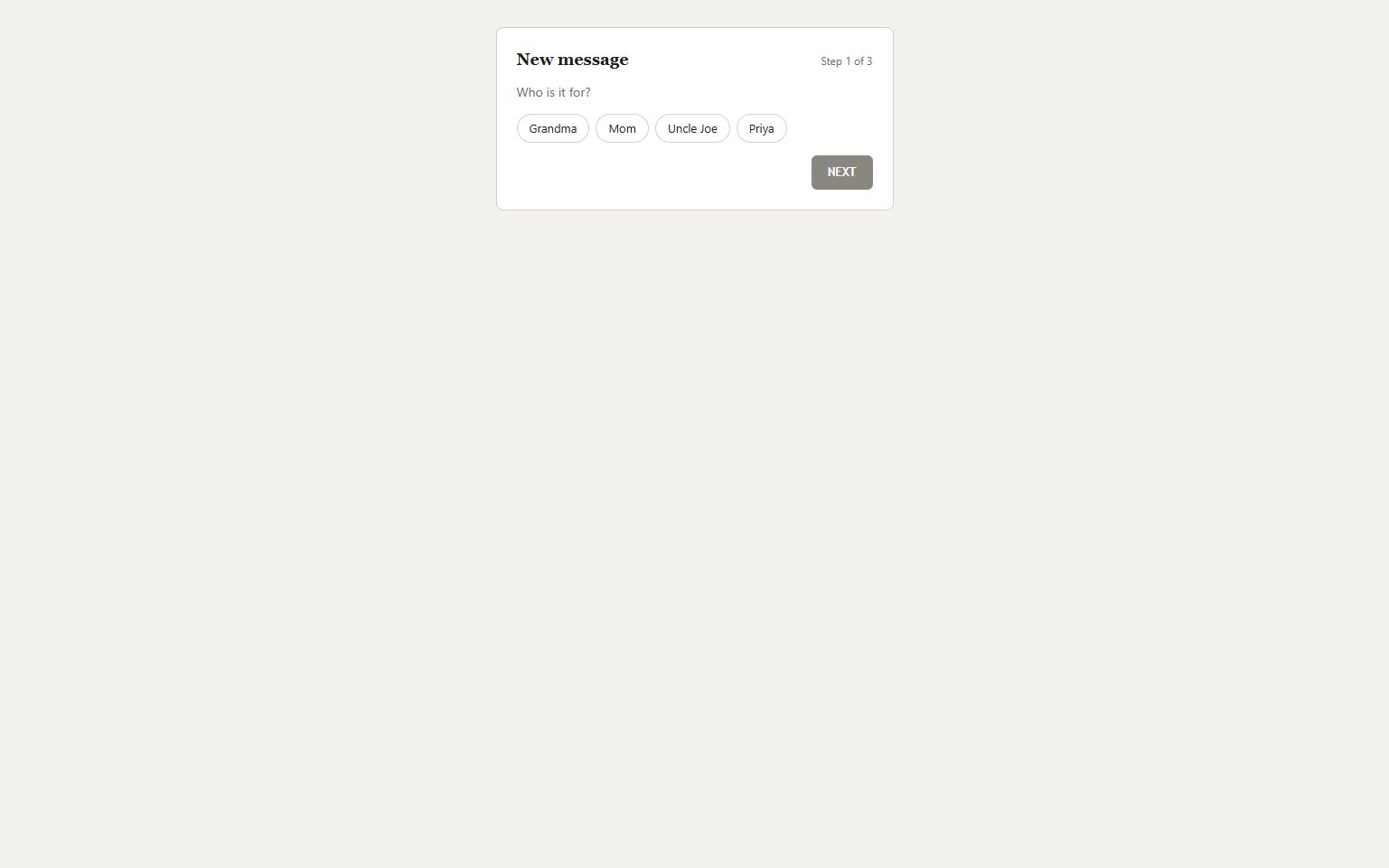
When there are no contacts the page shows just the question and NEXT, so a new user has no one to pick and no idea what to do.

The fix Fitts suggests: Add an empty-state message explaining there are no contacts and how to add one.

Who flagged it

4 of 5 reviewers (Novice, Power user, Accessibility, Trust & ethics)

What Fitts noticed

  • Tapped Grandma · nothing changed on screen step 30 · /contacts
  • Tapped Mom · nothing changed on screen step 31 · /contacts
  • Tapped Uncle Joe · nothing changed on screen step 32 · /contacts
  • Tapped Priya · nothing changed on screen step 33 · /contacts

Evidence

  • Who is it for? with no names and only NEXT
  • Tapped Grandma · nothing changed on screen
  • firstChange: null, settled: null for Grandma, Mom, Uncle Joe, Priya clicks

Sev 4 · Catastrophic H1 · Visibility of system status Accessibility Open: not fixed in this run

No visible focus when using the keyboard

On /compose, and 7 other pages: /compose/recipient /compose/confirm / /search /contacts /settings /contacts/grandma · in src/pages/Compose.tsx:35

Tabbing through the page shows no focus outline, so keyboard users can’t tell where they are.

The fix Fitts suggests: Remove the global outline: none and style :focus-visible instead.

Close up

The whole page

Who flagged it

4 of 5 reviewers (Novice, Accessibility, Power user, Trust & ethics), and one of Fitts’s own measurements

What Fitts noticed

  • Noticed button[data-ref="compose-contact-grandma"] shows no focus when tabbed to step 0 · /compose
  • Noticed button[data-ref="compose-contact-mom"] shows no focus when tabbed to step 0 · /compose
  • Noticed button[data-ref="compose-contact-uncle-joe"] shows no focus when tabbed to step 0 · /compose
  • Noticed button[data-ref="compose-contact-priya"] shows no focus when tabbed to step 0 · /compose
  • Noticed button[data-ref="compose-next-1"] shows no focus when tabbed to step 0 · /compose
  • Noticed textarea[data-ref="compose-body"] shows no focus when tabbed to step 5 · /compose/recipient
26 more lines
  • Noticed button[data-ref="compose-create"] shows no focus when tabbed to step 5 · /compose/recipient
  • Noticed button[data-ref="compose-next"] shows no focus when tabbed to step 5 · /compose/recipient
  • Noticed button[data-ref="compose-send"] shows no focus when tabbed to step 6 · /compose/confirm
  • Noticed button[data-ref="inbox-search"] shows no focus when tabbed to step 21 · /
  • Noticed button[data-ref="inbox-contacts"] shows no focus when tabbed to step 21 · /
  • Noticed button[data-ref="inbox-settings"] shows no focus when tabbed to step 21 · /
  • Noticed button[data-ref="inbox-thread-0"] shows no focus when tabbed to step 21 · /
  • Noticed button[data-ref="inbox-thread-1"] shows no focus when tabbed to step 21 · /
  • Noticed button[data-ref="inbox-thread-2"] shows no focus when tabbed to step 21 · /
  • Noticed input[data-ref="search-input"] shows no focus when tabbed to step 22 · /search
  • Noticed input[data-ref="contacts-filter"] shows no focus when tabbed to step 25 · /contacts
  • Noticed button[data-ref="contact-grandma"] shows no focus when tabbed to step 25 · /contacts
  • Noticed button[data-ref="contact-mom"] shows no focus when tabbed to step 25 · /contacts
  • Noticed button[data-ref="contact-uncle-joe"] shows no focus when tabbed to step 25 · /contacts
  • Noticed button[data-ref="contact-priya"] shows no focus when tabbed to step 25 · /contacts
  • Noticed form[data-ref="contacts-add"] shows no focus when tabbed to step 25 · /contacts
  • Noticed a[data-ref="settings-contacts"] shows no focus when tabbed to step 35 · /settings
  • Noticed button[data-ref="settings-sounds"] shows no focus when tabbed to step 35 · /settings
  • Noticed button[data-ref="settings-large-text"] shows no focus when tabbed to step 35 · /settings
  • Noticed button[data-ref="settings-read-receipts"] shows no focus when tabbed to step 35 · /settings
  • Noticed button[data-ref="settings-typing-indicator"] shows no focus when tabbed to step 35 · /settings
  • Noticed button[data-ref="settings-vibrate"] shows no focus when tabbed to step 35 · /settings
  • Noticed button[data-ref="thread-call"] shows no focus when tabbed to step 38 · /contacts/grandma
  • Noticed button[data-ref="thread-video"] shows no focus when tabbed to step 38 · /contacts/grandma
  • Noticed button[data-ref="thread-delete"] shows no focus when tabbed to step 38 · /contacts/grandma
  • Noticed button[data-ref="thread-message"] shows no focus when tabbed to step 38 · /contacts/grandma

Evidence

  • no visible change when focused with Tab (expected a visible focus indicator)
  • shows no focus when tabbed to
  • no visible change when focused with Tab

See it yourself

Start at http://localhost:5192/compose on desktop. Replayed and seen again

  1. Tap Grandma the page at this step
Expected
A visible focus indicator
Actual
No visible change when focused with Tab
Environment
Chromium 156 · 1536×960 · mouse · light · 100%
WCAG
2.4.7 Focus Visible
The Playwright test Fitts wrote
// No visible focus when using the keyboard
// Fitts repro · Chromium 156 · 1536×960 · mouse · light · 100%
// Steps: Tap Grandma
import { expect, test } from '@playwright/test';

test("No visible focus when using the keyboard", async ({ page }) => {
  await page.goto("http://localhost:5192/compose");
  await page.getByTestId("compose-contact-grandma").click();
  // Focus is visible (WCAG 2.4.7): focusing changes how the element looks.
  const el = page.getByTestId("compose-contact-grandma");
  const before = await el.evaluate((e) => { const s = getComputedStyle(e); return [s.outlineStyle, s.outlineWidth, s.boxShadow, s.borderColor, s.backgroundColor].join('|'); });
  await el.focus();
  const after = await el.evaluate((e) => { const s = getComputedStyle(e); return [s.outlineStyle, s.outlineWidth, s.boxShadow, s.borderColor, s.backgroundColor].join('|'); });
  expect(after).not.toBe(before);
});

Sev 4 · Catastrophic H2 · Match between system and the real world Usability Open: not fixed in this run

Page shows "null" instead of real content

On /compose/recipient, and 1 other page: /compose/confirm · in src/pages/Compose.tsx:75

The page shows "null": a missing value leaked onto the screen, so people can’t see what they chose.

The fix Fitts suggests: Read the right value, and show a clear fallback when it’s missing.

Close up

The whole page

Who flagged it

5 of 5 reviewers (Novice, Accessibility, Visual design, Trust & ethics, Power user), and one of Fitts’s own measurements

What Fitts noticed

  • Noticed the page shows "null" step 5 · /compose/recipient
  • Noticed the page shows "null" step 6 · /compose/confirm

Evidence

  • shows "null" (expected real content, not a placeholder)
  • To: (null) in the recipient field
  • page shows "null"

See it yourself

Start at http://localhost:5192/compose/recipient on desktop. Replayed and seen again

    Expected
    Real content, not a placeholder
    Actual
    Shows "null"
    Environment
    Chromium 156 · 1536×960 · mouse · light · 100%
    The Playwright test Fitts wrote
    // Page shows "null" instead of real content
    // Fitts repro · Chromium 156 · 1536×960 · mouse · light · 100%
    // Steps: open the page
    import { expect, test } from '@playwright/test';
    
    test("Page shows \"null\" instead of real content", async ({ page }) => {
      await page.goto("http://localhost:5192/compose/recipient");
      // No template leak on screen: no "(null)", "undefined" or "NaN" in what people read.
      await expect(page.getByTestId("compose-to")).not.toHaveText(/\((?:null|undefined)\)|\bundefined\b|\bNaN\b|^null$/);
    });
    

    Sev 4 · Catastrophic H9 · Help users recognize, diagnose and recover from errors Usability Open: not fixed in this run

    Error is a raw code, not an explanation

    On /compose/confirm, and 1 other page: /contacts · in src/pages/Compose.tsx:129

    When it fails the page shows "Error 0x3F", which doesn’t say what went wrong or how to fix it.

    The fix Fitts suggests: Say what went wrong in plain words, next to the field, and how to fix it.

    Who flagged it

    4 of 5 reviewers (Novice, Accessibility, Trust & ethics, Power user), and one of Fitts’s own measurements

    What Fitts noticed

    • Noticed an error that doesn’t help: "Error 0x3F", no field marked invalid step 7 · /compose/confirm
    • Noticed a request failed after tapping Send Text: POST /api/messages → 400 step 7 · /compose/confirm
    • Noticed an error that doesn’t help: "Invalid input", no field marked invalid step 26 · /contacts
    • Noticed a request failed after tapping Add: POST /api/contacts → 422 step 26 · /contacts

    Evidence

    • "Error 0x3F", no field marked invalid (expected says what went wrong and how to fix it, next to the field)
    • "Invalid input", no field marked invalid (expected says what went wrong and how to fix it, next to the field)
    • "Error 0x3F", no field marked invalid
    • POST /api/messages → 400 after tapping Send Text

    How Fitts got there

    1. Tapped “Create Message” → /compose/confirm

    Sev 4 · Catastrophic H9 · Help users recognize, diagnose and recover from errors Usability Open: not fixed in this run

    Refreshing a page breaks it

    On /compose/confirm, and 1 other page: /search · in src/App.tsx:18

    Refreshing /compose/confirm shows a blank page.

    The fix Fitts suggests: Make the page load on its own from its address.

    Who flagged it

    4 of 5 reviewers (Novice, Power user, Accessibility, Trust & ethics), and one of Fitts’s own measurements

    What Fitts noticed

    • Noticed refreshing /compose/confirm shows a blank page step 76 · /compose/confirm
    • Noticed refreshing /search shows a blank page step 76 · /search

    Evidence

    • refreshing /compose/confirm shows a blank page (expected /compose/confirm loads on its own)
    • refreshing /search shows a blank page (expected /search loads on its own)
    • refreshing /compose/confirm shows a blank page
    • "refreshing /compose/confirm shows a blank page"

    How Fitts got there

    1. Tapped “Create Message” → /compose/confirm

    Sev 4 · Catastrophic H6 · Recognition rather than recall Ergonomics Open: not fixed in this run

    A control moves just as you reach for it

    On /compose/confirm · in src/pages/Compose.tsx:136

    "Send Text" moved 59 px just before the tap.

    The fix Fitts suggests: Reserve space for late content so controls don’t move.

    Close up

    The whole page

    The moment

    /compose/confirm about 2 seconds before
    /compose/confirm about 2 seconds after

    Who flagged it

    3 of 5 reviewers (Novice, Power user, Accessibility), and one of Fitts’s own measurements

    What Fitts noticed

    • Noticed "Send Text" moved 59 px just before the tap step 7 · /compose/confirm
    • Noticed "Send Text" moved 58 px just before the tap step 21 · /compose/confirm
    • Noticed "Send Text" jumped 58 px down 0.1 s after the last tap, with no tap step 21 · /compose/confirm

    Evidence

    • "Send Text" moved 59 px just before the tap (expected controls stay put while the page loads)
    • "Send Text" moved 58 px just before the tap (expected controls stay put while the page loads)
    • "Send Text" moved 59 px just before the tap

    How Fitts got there

    1. Tapped “Create Message” → /compose/confirm
    2. Tapped “Send Text”

    Sev 4 · Catastrophic H1 · Visibility of system status Usability Open: not fixed in this run

    No confirmation after Send Text

    On /compose/confirm · in src/pages/Compose.tsx:136

    "Send Text" goes through, but nothing says it worked, so people can’t tell if it was sent.

    The fix Fitts suggests: Show a short confirmation ("Message sent") after it succeeds.

    Close up

    The whole page

    Who flagged it

    4 of 5 reviewers (Novice, Power user, Accessibility, Trust & ethics), and one of Fitts’s own measurements

    What Fitts noticed

    • Noticed Send Text gives no sign it’s working: "Send Text" saved with no confirmation step 21 · /compose/confirm

    Evidence

    • "Send Text" saved with no confirmation (expected a message that it worked)
    • "Send Text" saved with no confirmation

    How Fitts got there

    1. Tapped “Create Message” → /compose/confirm
    2. Tapped “Send Text”

    Sev 4 · Catastrophic H3 · User control and freedom Usability Open: not fixed in this run

    Going back loses what you typed

    On /compose/recipient · in src/pages/Compose.tsx:78

    Pressing Back mid-flow throws the draft away (after Back, what was typed is gone).

    The fix Fitts suggests: Keep the draft in shared state (or the URL) so Back restores it.

    Close up

    The whole page

    Who flagged it

    3 of 5 reviewers (Novice, Power user, Trust & ethics), and one of Fitts’s own measurements

    What Fitts noticed

    • Noticed going back lost what I typed: no back or cancel control on /compose/confirm step 19 · /compose/recipient
    • Noticed going back lost what I typed: after Back, what was typed is gone step 19 · /compose/recipient

    Evidence

    • after Back, what was typed is gone (expected what was typed is still there)
    • after Back, what was typed is gone
    • no back or cancel control that keeps what was entered

    How Fitts got there

    1. Tapped “Mom”
    2. Tapped “Mom”
    3. Tapped “Uncle Joe”
    4. Tapped “Uncle Joe”
    5. Tapped “Priya”
    6. Tapped “Priya”
    7. Opened /compose/recipient
    8. Typed in “Message”

    Sev 4 · Catastrophic H6 · Recognition rather than recall Accessibility Open: not fixed in this run

    Form elements must have labels

    On /contacts · in src/pages/Contacts.tsx:44

    Form elements must have labels (axe rule label). People using a screen reader, a keyboard or zoom run into this.

    The fix Fitts suggests: Fix the markup so the "label" rule passes: form elements must have labels.

    Close up

    The whole page

    Who flagged it

    2 of 5 reviewers (Novice, Accessibility), and one of Fitts’s own measurements

    What Fitts noticed

    • Noticed Form elements must have labels (axe) step 25 · /contacts
    • Noticed "input[data-ref="contacts-filter"]" can't be reached with Tab step 25 · /contacts

    Evidence

    • Form elements must have labels (expected passes the axe rule)
    • Search field name is empty ""
    • Form elements must have labels
    • textbox with empty name

    How Fitts got there

    1. Tapped “Contacts” → /contacts
    2. Tapped “Add”
    3. Typed in “contacts-filter”

    Sev 4 · Catastrophic Accessibility Open: not fixed in this run

    A control can’t be reached with the keyboard

    On /contacts · in src/pages/Contacts.tsx:44

    "input[data-ref="contacts-filter"]" can't be reached with Tab, so people who don't use a mouse can't use it.

    The fix Fitts suggests: Use a real button or link, or give it tabindex="0" and key handlers.

    Close up

    The whole page

    Who flagged it

    3 of 5 reviewers (Novice, Power user, Accessibility), and one of Fitts’s own measurements

    What Fitts noticed

    • Noticed button[data-ref="contact-grandma"] shows no focus when tabbed to step 25 · /contacts
    • Noticed "input[data-ref="contacts-filter"]" can't be reached with Tab step 25 · /contacts
    • Noticed "Grandma" can't be reached with Tab step 25 · /contacts
    • Noticed "Mom" can't be reached with Tab step 25 · /contacts
    • Noticed "Uncle Joe" can't be reached with Tab step 25 · /contacts
    • Noticed "Priya" can't be reached with Tab step 25 · /contacts
    • Noticed "Name" can't be reached with Tab step 25 · /contacts

    Evidence

    • "input[data-ref="contacts-filter"]" can't be reached with Tab (expected every control reachable from the keyboard)
    • "Grandma" can't be reached with Tab (expected every control reachable from the keyboard)
    • "Mom" can't be reached with Tab (expected every control reachable from the keyboard)
    • "Grandma" can't be reached with Tab
    • button shows no focus when tabbed to
    • "input[data-ref=\"contacts-filter\"]" can't be reached with Tab

    How Fitts got there

    1. Tapped “Contacts” → /contacts
    2. Tapped “Add”
    3. Typed in “contacts-filter”

    Sev 4 · Catastrophic H4 · Consistency and standards Usability Open: not fixed in this run

    A link goes to the wrong page

    On /settings · in src/pages/Settings.tsx:27

    "Contacts" went to /settings/privacy (its link says /contacts).

    The fix Fitts suggests: Point the control at the page it names.

    Close up

    The whole page

    Who flagged it

    4 of 5 reviewers (Novice, Power user, Accessibility, Trust & ethics), and one of Fitts’s own measurements

    What Fitts noticed

    • Noticed "Contacts" went to /settings/privacy (its link says /contacts) step 36 · /settings
    • Noticed Contacts is small to tap: 300×17px (needs at least 24×24px) step 76 · /settings
    • Noticed Contacts is small to tap: 394×18px (needs at least 24×24px) step 76 · /settings

    Evidence

    • "Contacts" went to /settings/privacy (its link says /contacts) (expected "Contacts" opens /contacts)
    • "Contacts" went to /settings/privacy (its link says /contacts)
    • Contacts link href is /contacts in snapshot
    • Link label is "Contacts" with href "/contacts"

    How Fitts got there

    1. Tapped “Settings” → /settings
    2. Tapped “Contacts” → /settings/privacy

    Sev 4 · Catastrophic H8 · Aesthetic and minimalist design Accessibility Open: not fixed in this run

    Images must have alternative text

    On / · in src/pages/Inbox.tsx:70

    Images must have alternative text (axe rule image-alt). People using a screen reader, a keyboard or zoom run into this.

    The fix Fitts suggests: Fix the markup so the "image-alt" rule passes: images must have alternative text.

    Close up

    The whole page

    Who flagged it

    1 of 5 reviewers (Accessibility), and one of Fitts’s own measurements

    What Fitts noticed

    • Noticed Images must have alternative text (axe) step 21 · /

    Evidence

    • Images must have alternative text (expected passes the axe rule)
    • Images must have alternative text (axe)

    How Fitts got there

    1. Typed in “Phone”
    2. Typed in “Phone”
    3. Typed in “Phone”
    4. Opened /
    5. Tapped “Settings” → /settings
    6. Tapped “Contacts” → /settings/privacy
    7. Opened /
    8. Tapped “Grandma Call me when you can, sweetheart. 10/27/26” → /contacts/grandma

    Sev 4 · Catastrophic H8 · Aesthetic and minimalist design Look & feel Open: not fixed in this run

    Delete looks more important than calling

    On /contacts/grandma · in src/pages/Thread.tsx:59

    Delete conversation draws the eye more than the phone and video icons, so a grandparent may tap the destructive action by mistake.

    The fix Fitts suggests: De-emphasize Delete to muted text or a menu and make call and message the visual primaries.

    Close up

    The whole page

    Who flagged it

    2 of 5 reviewers (Visual design, Trust & ethics)

    Evidence

    • Delete conversation in red underline next to tiny icons
    • Call and video are icon-only with no labels
    • controls include {"ref":"thread-delete","role":"button","name":"Delete conversation"}

    How Fitts got there

    1. Tapped “Grandma Call me when you can, sweetheart. 10/27/26” → /contacts/grandma
    2. Tapped “thread-video”
    3. Tapped “Delete conversation”

    Sev 4 · Catastrophic H2 · Match between system and the real world Content Open: not fixed in this run

    Settings wording is confusing jargon

    On /settings, and 1 other page: /contacts/grandma · in src/pages/Settings.tsx:44

    A first-time grandparent does not know what words like Read receipts or Typing indicator mean, so they avoid changing anything.

    The fix Fitts suggests: Rewrite settings in plain language and add a short sub-caption explaining each.

    Close up

    The whole page

    Who flagged it

    3 of 5 reviewers (Novice, Power user, Accessibility)

    Evidence

    • Read receipts
    • Typing indicator / Link previews / Enter to send
    • button name "Initialize thread"

    How Fitts got there

    1. Tapped “Uncle Joe Ha! Good one. 10/25/26”
    2. Tapped “Help” → /help
    3. Opened /
    4. Tapped “Compose” → /compose
    5. Opened /settings
    6. Tapped “Sounds”
    7. Tapped “Large text”
    8. Tapped “Read receipts”

    Sev 3 · Major H4 · Consistency and standards Look & feel Open: not fixed in this run

    Too many font families

    On /compose, and 4 other pages: /compose/recipient / /contacts /contacts/grandma · in src/pages/Compose.tsx:11

    The site mixes georgia with other families; inconsistent type makes pages feel unrelated.

    The fix Fitts suggests: Use one family for text (two at most, with a clear role each).

    Close up

    The whole page

    Who flagged it

    1 of 5 reviewers (Visual design), and one of Fitts’s own measurements

    What Fitts noticed

    • Noticed georgia (1 elements) step 0 · /compose
    • Noticed system-ui (6 elements) step 0 · /compose
    • Noticed georgia (1 elements) step 5 · /compose/recipient
    • Noticed system-ui (3 elements) step 5 · /compose/recipient
    • Noticed trebuchet ms (1 elements) step 5 · /compose/recipient
    • Noticed georgia (1 elements) step 21 · /
    9 more lines
    • Noticed system-ui (13 elements) step 21 · /
    • Noticed trebuchet ms (1 elements) step 21 · /
    • Noticed georgia (1 elements) step 25 · /contacts
    • Noticed system-ui (6 elements) step 25 · /contacts
    • Noticed trebuchet ms (1 elements) step 25 · /contacts
    • Noticed georgia (1 elements) step 38 · /contacts/grandma
    • Noticed system-ui (7 elements) step 38 · /contacts/grandma
    • Noticed trebuchet ms (1 elements) step 38 · /contacts/grandma
    • Noticed text overlaps the text below it with wider spacing step 76 · /compose

    Evidence

    • georgia (1 elements) (expected at most 2 font families)
    • system-ui (6 elements) (expected at most 2 font families)
    • trebuchet ms (1 elements) (expected at most 2 font families)
    • 3 font families (georgia, system-ui, trebuchet ms)
    • trebuchet ms (1 elements)

    Sev 3 · Major Accessibility Open: not fixed in this run

    Text breaks with wider spacing on Text spacing · 1280 wide

    On /compose, and 2 other pages: /compose/recipient /compose/confirm · seen at Text spacing · 1280 wide · in src/pages/Compose.tsx:11

    With WCAG’s text spacing applied (1.5 line height, wider letters and words), text overlaps the text below it with wider spacing.

    The fix Fitts suggests: Let text containers grow with their content; avoid fixed heights and overflow: hidden on text.

    Who flagged it

    1 of 5 reviewers (Accessibility), and one of Fitts’s own measurements

    What Fitts noticed

    • Noticed text overlaps the text below it with wider spacing step 76 · /compose
    • Noticed text overlaps the text below it with wider spacing step 76 · /compose/recipient
    • Noticed text overlaps the text below it with wider spacing step 76 · /compose/confirm

    Evidence

    • text overlaps the text below it with wider spacing on Text spacing · 1280 wide (expected text that keeps its room at 1.5 line height)
    • text overlaps the text below it with wider spacing

    Sev 3 · Major H1 · Visibility of system status Usability Open: not fixed in this run

    No sign the page is loading

    On /compose, and 3 other pages: / /contacts/grandma /search · in src/App.tsx:14

    No sign /compose is loading when contacts takes 3 s.

    The fix Fitts suggests: Show a loading indicator within a second.

    Who flagged it

    4 of 5 reviewers (Novice, Power user, Accessibility, Trust & ethics), and one of Fitts’s own measurements

    What Fitts noticed

    • Noticed no sign /compose is loading when contacts takes 3 s step 76 · /compose
    • Noticed no sign / is loading when conversations takes 3 s step 76 · /
    • Noticed no sign /contacts/grandma is loading when conversations takes 3 s step 76 · /contacts/grandma

    Evidence

    • no sign /compose is loading when contacts takes 3 s (expected a loading indicator within 1 s)
    • no sign / is loading when conversations takes 3 s (expected a loading indicator within 1 s)
    • no sign /contacts/grandma is loading when conversations takes 3 s (expected a loading indicator within 1 s)
    • no sign /compose is loading when contacts takes 3 s
    • Same card shown with no progress sign

    Sev 3 · Major H8 · Aesthetic and minimalist design Look & feel Open: not fixed in this run

    Spacing is inconsistent and off-grid

    On /compose, and 8 other pages: /compose/recipient /compose/confirm / /search /contacts /settings /settings/privacy /contacts/grandma · in src/pages/Compose.tsx:35

    Padding and margins use odd values (padding-top 6px), so spacing looks uneven from one element to the next.

    The fix Fitts suggests: Use spacing tokens on a 4px grid.

    Close up

    The whole page

    Who flagged it

    1 of 5 reviewers (Visual design), and one of Fitts’s own measurements

    What Fitts noticed

    • Noticed spacing off the grid: padding-top 6px step 0 · /compose
    • Noticed spacing off the grid: row-gap 7px step 0 · /compose
    • Noticed spacing off the grid: padding-right 13px step 0 · /compose
    • Noticed spacing off the grid: row-gap 14px step 0 · /compose
    • Noticed button[data-ref="compose-contact-grandma"] shows no focus when tabbed to step 0 · /compose
    • Noticed spacing off the grid: padding-top 9px step 5 · /compose/recipient
    41 more lines
    • Noticed spacing off the grid: padding-top 10px step 5 · /compose/recipient
    • Noticed spacing off the grid: padding-right 13px step 5 · /compose/recipient
    • Noticed spacing off the grid: row-gap 14px step 5 · /compose/recipient
    • Noticed spacing off the grid: padding-right 18px step 5 · /compose/recipient
    • Noticed spacing off the grid: padding-right 22px step 5 · /compose/recipient
    • Noticed spacing off the grid: row-gap 5px step 6 · /compose/confirm
    • Noticed spacing off the grid: padding-top 11px step 6 · /compose/confirm
    • Noticed spacing off the grid: row-gap 14px step 6 · /compose/confirm
    • Noticed spacing off the grid: padding-right 22px step 6 · /compose/confirm
    • Noticed spacing off the grid: padding-top 30px step 6 · /compose/confirm
    • Noticed Grandma gives no sign it’s working: "Grandma" changed nothing on screen step 10 · /compose
    • Tapped Grandma · nothing changed on screen step 10 · /compose
    • Noticed spacing off the grid: padding-top 7px step 21 · /
    • Noticed spacing off the grid: padding-top 10px step 21 · /
    • Noticed spacing off the grid: row-gap 11px step 21 · /
    • Noticed spacing off the grid: row-gap 14px step 21 · /
    • Noticed spacing off the grid: padding-right 18px step 21 · /
    • Noticed spacing off the grid: padding-right 22px step 21 · /
    • Noticed spacing off the grid: padding-right 11px step 22 · /search
    • Noticed spacing off the grid: row-gap 14px step 22 · /search
    • Noticed spacing off the grid: padding-right 22px step 22 · /search
    • Noticed spacing off the grid: padding-top 30px step 22 · /search
    • Noticed spacing off the grid: row-gap 7px step 25 · /contacts
    • Noticed spacing off the grid: padding-right 9px step 25 · /contacts
    • Noticed spacing off the grid: padding-top 10px step 25 · /contacts
    • Noticed spacing off the grid: padding-right 11px step 25 · /contacts
    • Noticed spacing off the grid: padding-top 13px step 25 · /contacts
    • Noticed spacing off the grid: row-gap 14px step 25 · /contacts
    • Noticed spacing off the grid: padding-top 3px step 35 · /settings
    • Noticed spacing off the grid: row-gap 14px step 35 · /settings
    • Noticed spacing off the grid: padding-right 22px step 35 · /settings
    • Noticed spacing off the grid: padding-top 30px step 35 · /settings
    • Noticed spacing off the grid: row-gap 14px step 36 · /settings/privacy
    • Noticed spacing off the grid: padding-right 22px step 36 · /settings/privacy
    • Noticed spacing off the grid: padding-top 30px step 36 · /settings/privacy
    • Noticed spacing off the grid: padding-top 5px step 38 · /contacts/grandma
    • Noticed spacing off the grid: padding-top 7px step 38 · /contacts/grandma
    • Noticed spacing off the grid: row-gap 9px step 38 · /contacts/grandma
    • Noticed spacing off the grid: padding-top 10px step 38 · /contacts/grandma
    • Noticed spacing off the grid: row-gap 13px step 38 · /contacts/grandma
    • Noticed spacing off the grid: row-gap 14px step 38 · /contacts/grandma

    Evidence

    • padding-top 6px (expected a multiple of 4px)
    • row-gap 7px (expected a multiple of 4px)
    • padding-top 10px (expected a multiple of 4px)
    • spacing values in use: 6, 7, 10, 13, 14, 18, 22, 30px
    • padding-top 6px

    How Fitts got there

    1. Tapped “Grandma”

    Sev 3 · Major H8 · Aesthetic and minimalist design Accessibility Open: not fixed in this run

    Text is too faint to read

    On /compose, and 4 other pages: /compose/recipient / /contacts /contacts/grandma · in src/pages/Compose.tsx:48

    Some text has text contrast 3.6:1, below the 4.5:1 contrast people need to read it comfortably.

    The fix Fitts suggests: Darken the text color to reach at least 4.5:1 contrast.

    Close up

    The whole page

    Who flagged it

    3 of 5 reviewers (Novice, Accessibility, Visual design), and one of Fitts’s own measurements

    What Fitts noticed

    • Noticed text that’s hard to read: text contrast 3.6:1 (needs at least 4.5:1) step 0 · /compose
    • Noticed trebuchet ms (1 elements) step 0 · /compose
    • Noticed spacing off the grid: padding-top 10px step 0 · /compose
    • Noticed spacing off the grid: padding-right 18px step 0 · /compose
    • Noticed button[data-ref="compose-next-1"] shows no focus when tabbed to step 0 · /compose
    • Noticed text that’s hard to read: text contrast 3.6:1 (needs at least 4.5:1) step 5 · /compose/recipient
    6 more lines
    • Noticed text that’s hard to read: placeholder contrast 2.6:1 (needs at least 4.5:1) step 5 · /compose/recipient
    • Noticed text that’s hard to read: text contrast 1.9:1 (needs at least 4.5:1) step 21 · /
    • Noticed text that’s hard to read: text contrast 3.6:1 (needs at least 4.5:1) step 21 · /
    • Noticed text that’s hard to read: text contrast 3.6:1 (needs at least 4.5:1) step 25 · /contacts
    • Noticed text that’s hard to read: text contrast 4.4:1 (needs at least 4.5:1) step 38 · /contacts/grandma
    • Noticed text that’s hard to read: text contrast 3.6:1 (needs at least 4.5:1) step 38 · /contacts/grandma

    Evidence

    • text contrast 3.6:1 (expected at least 4.5:1)
    • text contrast 1.9:1 (expected at least 4.5:1)
    • text contrast 3.6:1 (needs at least 4.5:1)
    • text contrast 3.6:1

    How Fitts got there

    1. Tapped “Grandma”
    2. Tapped “Mom”
    3. Tapped “Uncle Joe”
    4. Tapped “Priya”
    5. Tapped “NEXT” → /compose/recipient

    Sev 3 · Major H7 · Flexibility and efficiency of use Ergonomics Open: not fixed in this run

    Tap target is too small

    On /compose/recipient, and 4 other pages: /compose/confirm / /settings /contacts/grandma · in src/pages/Compose.tsx:87

    This control is 84×17px, smaller than the 24×24px minimum, so it's easy to miss.

    The fix Fitts suggests: Give it at least 44×44px of tappable area (padding counts).

    Close up

    The whole page

    Who flagged it

    5 of 5 reviewers (Novice, Power user, Accessibility, Visual design, Trust & ethics), and one of Fitts’s own measurements

    What Fitts noticed

    • Noticed button[data-ref="compose-create"] is small to tap: 84×17px (needs at least 24×24px) step 5 · /compose/recipient
    • Noticed button[data-ref="compose-send"] is small to tap: 28×20px (needs at least 24×24px) step 6 · /compose/confirm
    • Noticed the text cut off at 360px step 6 · /compose/confirm
    • Noticed the text cut off at 768px step 6 · /compose/confirm
    • Noticed the text cut off at 1280px step 6 · /compose/confirm
    • Noticed button[data-ref="inbox-search"] is small to tap: 35×17px (needs at least 24×24px) step 21 · /
    24 more lines
    • Noticed button[data-ref="inbox-contacts"] is small to tap: 46×17px (needs at least 24×24px) step 21 · /
    • Noticed button[data-ref="inbox-settings"] is small to tap: 43×17px (needs at least 24×24px) step 21 · /
    • Noticed a[data-ref="inbox-help"] is small to tap: 25×17px (needs at least 24×24px) step 21 · /
    • Noticed Settings is far and small for a primary action: ID 4.9 bits (481px away, 17px wide) step 35 · /
    • Noticed a[data-ref="settings-contacts"] is small to tap: 394×17px (needs at least 24×24px) step 35 · /settings
    • Noticed button[data-ref="settings-sounds"] is small to tap: 36×20px (needs at least 24×24px) step 35 · /settings
    • Noticed button[data-ref="settings-large-text"] is small to tap: 36×20px (needs at least 24×24px) step 35 · /settings
    • Noticed button[data-ref="settings-read-receipts"] is small to tap: 36×20px (needs at least 24×24px) step 35 · /settings
    • Noticed button[data-ref="settings-typing-indicator"] is small to tap: 36×20px (needs at least 24×24px) step 35 · /settings
    • Noticed button[data-ref="settings-vibrate"] is small to tap: 36×20px (needs at least 24×24px) step 35 · /settings
    • Noticed button[data-ref="thread-delete"] is small to tap: 105×17px (needs at least 24×24px) step 38 · /contacts/grandma
    • Noticed the text cut off at 320px step 76 · /compose/confirm
    • Noticed Contacts is small to tap: 230×17px (needs at least 24×24px) step 76 · /settings
    • Noticed the text cut off at 390px step 76 · /compose/confirm
    • Noticed the text cut off at 844px step 76 · /compose/confirm
    • Noticed the text cut off at 1440px step 76 · /compose/confirm
    • Noticed the text cut off at 200% text step 76 · /compose/confirm
    • Noticed button[data-ref="compose-create"] is small to tap: 106×18px (needs at least 24×24px) step 76 · /compose/recipient
    • Noticed button[data-ref="inbox-search"] is small to tap: 44×18px (needs at least 24×24px) step 76 · /
    • Noticed button[data-ref="inbox-contacts"] is small to tap: 58×18px (needs at least 24×24px) step 76 · /
    • Noticed button[data-ref="inbox-settings"] is small to tap: 54×18px (needs at least 24×24px) step 76 · /
    • Noticed a[data-ref="inbox-help"] is small to tap: 31×18px (needs at least 24×24px) step 76 · /
    • Noticed button[data-ref="thread-delete"] is small to tap: 134×18px (needs at least 24×24px) step 76 · /contacts/grandma
    • Noticed one action with different names: "Create Message" and "next" do the same thing on /compose/recipient step 76 · /compose/recipient

    Evidence

    • 84×17px (expected at least 24×24px)
    • 28×20px (expected at least 24×24px)
    • 35×17px (expected at least 24×24px)
    • button[data-ref="compose-create"] is small to tap: 84×17px
    • 106×18px (needs at least 24×24px)

    How Fitts got there

    1. Tapped “NEXT” → /compose/recipient
    2. Tapped “Create Message” → /compose/confirm

    Sev 3 · Major H7 · Flexibility and efficiency of use Ergonomics Open: not fixed in this run

    Tap target is too small on Text spacing · 1280 wide

    On /compose/recipient, and 3 other pages: / /settings /contacts/grandma · seen at Text spacing · 1280 wide · in src/pages/Compose.tsx:87

    This control is 106×18px, smaller than the 24×24px minimum, so it's easy to miss.

    The fix Fitts suggests: Give it at least 44×44px of tappable area (padding counts).

    Who flagged it

    one of Fitts’s own measurements

    Evidence

    • 106×18px on Text spacing · 1280 wide (expected at least 24×24px)
    • 44×18px on Text spacing · 1280 wide (expected at least 24×24px)
    • 58×18px on Text spacing · 1280 wide (expected at least 24×24px)

    How Fitts got there

    1. Tapped “NEXT” → /compose/recipient
    2. Tapped “Create Message” → /compose/confirm

    Sev 3 · Major H4 · Consistency and standards Usability Open: not fixed in this run

    One action has different labels

    On /compose/recipient · in src/pages/Compose.tsx:87

    "Create Message" and "next" do the same thing on /compose/recipient, so people can’t tell whether they’re the same action.

    The fix Fitts suggests: Use one label for one action throughout the flow.

    Close up

    The whole page

    Who flagged it

    5 of 5 reviewers (Novice, Power user, Accessibility, Visual design, Trust & ethics), and one of Fitts’s own measurements

    What Fitts noticed

    • Noticed one action with different names: "Create Message" and "next" do the same thing on /compose/recipient step 76 · /compose/recipient
    • Noticed one action with different names: "NEXT" and "create message" do the same thing on /compose/recipient step 76 · /compose/recipient
    • Noticed one action with different names: the /compose flow moves on with "NEXT", "Create Message", "Send Text" step 76 · /compose/recipient

    Evidence

    • "Create Message" and "next" do the same thing on /compose/recipient (expected one label for one action)
    • "NEXT" and "create message" do the same thing on /compose/recipient (expected one label for one action)
    • the /compose flow moves on with "NEXT", "Create Message", "Send Text" (expected the same word for the same step)
    • tapping Create Message → /compose/confirm
    • tapping NEXT → /compose/confirm
    • "Create Message" and "next" do the same thing on /compose/recipient

    How Fitts got there

    1. Tapped “NEXT” → /compose/recipient
    2. Tapped “Create Message” → /compose/confirm

    Sev 3 · Major H3 · User control and freedom Usability Open: not fixed in this run

    The page jumps while you use it

    On /compose/confirm · in src/pages/Compose.tsx:142

    The Send Text control jumps down as content loads above it, and then an unrelated 'Rate now' prompt pops up over the messages list the person was just returned to.

    The fix Fitts suggests: Reserve the space before the content arrives, so nothing moves under the pointer.

    The moment

    /compose/confirm about 2 seconds before
    /compose/confirm about 2 seconds after

    Who flagged it

    1 of 5 reviewers (Judge)

    What Fitts noticed

    • Noticed "Send Text" jumped 58 px down 0.1 s after the last tap, with no tap step 21 · /compose/confirm

    Evidence

    • "Send Text" jumped 58 px down 0.1 s after the last tap, with no tap

    How Fitts got there

    1. Tapped “Create Message” → /compose/confirm

    Sev 3 · Major H3 · User control and freedom Usability Open: not fixed in this run

    Something pops up without being asked

    On / · in src/pages/Inbox.tsx:18

    After tapping Search and waiting for that page, an unrelated 'Rate us' prompt pops up over the Messages list instead.

    The fix Fitts suggests: Show it only when the person asks, or in a place that doesn’t cover what they’re doing.

    The moment

    / about 2 seconds before
    / about 2 seconds after

    Who flagged it

    1 of 5 reviewers (Judge)

    What Fitts noticed

    • Noticed a dialog ("Rate us") popped up 1.7 s after the last tap without anything prompting it step 22 · /

    Evidence

    • a dialog ("Rate us") popped up 1.7 s after the last tap without anything prompting it

    How Fitts got there

    1. Tapped “Send Text” → /

    Sev 3 · Major H1 · Visibility of system status Usability Open: not fixed in this run

    No loading indicator while waiting

    On /search · in src/pages/Search.tsx:22

    There’s a 2.8s wait with nothing on screen, so it looks like nothing happened.

    The fix Fitts suggests: Show a loading indicator within 0.1s and keep it until results arrive.

    Close up

    The whole page

    Who flagged it

    4 of 5 reviewers (Novice, Power user, Accessibility, Trust & ethics), and one of Fitts’s own measurements

    What Fitts noticed

    • Noticed Search messages gives no sign it’s working: 2.8s wait with no loading indicator step 23 · /search
    • Typed in Search messages · waited 2.8 s for the server, with nothing on screen saying it was working step 23 · /search
    • Noticed 8 requests for 8 characters typed step 76 · /search
    • Noticed /api/search fetched 8 times, no Cache-Control or ETag step 76 · /search
    • Noticed /api/search returns 1.9 MB, 20,000 items step 76 · /search
    • Noticed no sign /search is loading when search takes 3 s step 76 · /search

    Evidence

    • 2.8s wait with no loading indicator (expected a loading indicator within 1s)
    • Typed in Search messages · waited 2.8 s for the server, with nothing on screen saying it was working
    • 2.8s wait with no loading indicator

    How Fitts got there

    1. Tapped “Search” → /search
    2. Typed in “Search messages”

    Sev 3 · Major H7 · Flexibility and efficiency of use Performance Open: not fixed in this run

    Search sends a request on every keystroke

    On /search · in src/pages/Search.tsx:22

    Typing sent 8 requests for 8 characters typed, which wastes data and makes results flicker.

    The fix Fitts suggests: Debounce the search (about 250ms after typing stops).

    Close up

    The whole page

    Who flagged it

    3 of 5 reviewers (Novice, Power user, Accessibility), and one of Fitts’s own measurements

    What Fitts noticed

    • Noticed 8 requests for 8 characters typed step 76 · /search
    • Noticed /api/search fetched 8 times, no Cache-Control or ETag step 76 · /search
    • Noticed /api/search returns 1.9 MB, 20,000 items step 76 · /search

    Evidence

    • 8 requests for 8 characters typed (expected one request after typing pauses (debounce))
    • 8 requests for 8 characters typed
    • /api/search returns 1.9 MB, 20,000 items

    How Fitts got there

    1. Tapped “Search” → /search
    2. Typed in “Search messages”

    Sev 3 · Major H8 · Aesthetic and minimalist design Ergonomics Open: not fixed in this run

    Page scrolls sideways on small screens on a phone

    On /settings · seen at Reflow · 320×640 · in src/App.tsx:39

    At narrow widths the page is wider than the screen (page is 341px wide at 320px).

    The fix Fitts suggests: Let content wrap and size to the viewport.

    Who flagged it

    4 of 5 reviewers (Novice, Power user, Accessibility, Trust & ethics), and one of Fitts’s own measurements

    What Fitts noticed

    • Noticed the page is 341px wide at 320px step 76 · /settings

    Evidence

    • page is 341px wide at 320px on Reflow · 320×640 (expected no sideways scrolling at 320px)
    • page is 341px wide at 320px
    • Noticed the page is 341px wide at 320px
    • measured: page is 341px wide at 320px

    How Fitts got there

    1. Tapped “Settings” → /settings

    Sev 3 · Major H2 · Match between system and the real world Accessibility Open: not fixed in this run

    Icon buttons have no accessible name

    On /contacts/grandma · in src/pages/Thread.tsx:53

    Screen readers announce these buttons as just "button", so people can’t tell what they do.

    The fix Fitts suggests: Add an aria-label that says what each button does.

    Close up

    The whole page

    Who flagged it

    2 of 5 reviewers (Novice, Accessibility), and one of Fitts’s own measurements

    What Fitts noticed

    • Noticed this button has no name a screen reader can say step 38 · /contacts/grandma

    Evidence

    • button with no accessible name (expected a name people and screen readers can use)
    • button with no accessible name
    • Phone and video icons show with no text label
    • button-name probe: "button with no accessible name" for thread-call, thread-video

    How Fitts got there

    1. Tapped “Grandma Call me when you can, sweetheart. 10/27/26” → /contacts/grandma

    Sev 3 · Major H10 · Help and documentation Usability Open: not fixed in this run

    Link goes to a missing page

    On / · in src/pages/Inbox.tsx:106

    /help returns 404: people who follow it hit a dead end.

    The fix Fitts suggests: Point the link at a real page, or remove it.

    Close up

    The whole page

    Who flagged it

    5 of 5 reviewers (Novice, Power user, Accessibility, Trust & ethics, Visual design), and one of Fitts’s own measurements

    What Fitts noticed

    • Noticed the page is 980px wide at 320px step 76 · /help
    • Noticed the page is 980px wide at 390px step 76 · /help
    • Noticed a link that doesn’t work: /help returns 404 step 76 · /
    • Noticed refreshing /help answers 404 step 76 · /help

    Evidence

    • /help returns 404 (expected a page that loads)
    • /help returns 404

    How Fitts got there

    1. Tapped “Grandma Call me when you can, sweetheart. 10/27/26” → /contacts/grandma
    2. Tapped “thread-video”
    3. Tapped “Delete conversation”
    4. Tapped “Initialize thread” → /compose
    5. Opened /
    6. Tapped “Mom Dinner at 6 on Friday? 10/26/26”
    7. Tapped “Uncle Joe Ha! Good one. 10/25/26”
    8. Tapped “Help” → /help

    Sev 2 · Minor H3 · User control and freedom Usability Open: not fixed in this run

    No back or cancel in this flow

    On /compose/recipient · in src/App.tsx:16

    There’s no back or cancel control on /compose/confirm, so people who change their mind are stuck.

    The fix Fitts suggests: Add a Back link (and Cancel) on every step.

    Who flagged it

    one of Fitts’s own measurements

    What Fitts noticed

    • Noticed going back lost what I typed: no back or cancel control on /compose/confirm step 19 · /compose/recipient

    Evidence

    • no back or cancel control on /compose/confirm (expected a visible way back that keeps what was entered)

    How Fitts got there

    1. Tapped “NEXT” → /compose/recipient

    Sev 2 · Minor Accessibility Open: not fixed in this run

    Page breaks at 200% text on Text at 200% · 1280 wide

    On /compose/confirm · seen at Text at 200% · 1280 wide · in src/pages/Compose.tsx:136

    At 200% text size, text cut off at 200% text.

    The fix Fitts suggests: Size layout in rem and let content wrap, so text can double without clipping.

    Who flagged it

    one of Fitts’s own measurements

    Evidence

    • text cut off at 200% text on Text at 200% · 1280 wide (expected text that fits or wraps at 200% text)

    How Fitts got there

    1. Tapped “Create Message” → /compose/confirm
    2. Tapped “Send Text”

    Sev 2 · Minor H1 · Visibility of system status Accessibility Open: not fixed in this run

    Placeholder text is too faint to read

    On /compose/recipient · in src/pages/Compose.tsx:78

    The hint text inside the field has contrast 2.6:1, so people with low vision can't read it.

    The fix Fitts suggests: Darken the placeholder color to reach at least 4.5:1 contrast.

    Close up

    The whole page

    Who flagged it

    2 of 5 reviewers (Novice, Accessibility), and one of Fitts’s own measurements

    What Fitts noticed

    • Noticed text that’s hard to read: text contrast 3.6:1 (needs at least 4.5:1) step 5 · /compose/recipient
    • Noticed text that’s hard to read: placeholder contrast 2.6:1 (needs at least 4.5:1) step 5 · /compose/recipient
    • Noticed going back lost what I typed: after Back, what was typed is gone step 19 · /compose/recipient

    Evidence

    • placeholder contrast 2.6:1 (expected at least 4.5:1)
    • "Write your message" looks very faint
    • placeholder contrast 2.6:1 (needs at least 4.5:1)

    How Fitts got there

    1. Tapped “Mom”
    2. Tapped “Mom”
    3. Tapped “Uncle Joe”
    4. Tapped “Uncle Joe”
    5. Tapped “Priya”
    6. Tapped “Priya”
    7. Opened /compose/recipient
    8. Typed in “Message”

    Sev 2 · Minor Accessibility Open: not fixed in this run

    Page doesn’t work in landscape on a phone

    On /search · seen at iPhone landscape · 844×390 · in src/pages/Compose.tsx:11

    In landscape, the page only 6 characters of text show in landscape.

    The fix Fitts suggests: Support both orientations; never ask people to rotate their device.

    Who flagged it

    1 of 5 reviewers (Accessibility), and one of Fitts’s own measurements

    What Fitts noticed

    • Noticed the page only 6 characters of text show in landscape step 76 · /search

    Evidence

    • only 6 characters of text show in landscape on iPhone landscape · 844×390 (expected the same content as in portrait)
    • only 6 characters of text show in landscape

    How Fitts got there

    1. Tapped “Search” → /search

    Sev 2 · Minor Performance Open: not fixed in this run

    Repeated requests aren’t cached

    On /search · in src/pages/Search.tsx:22

    /api/search fetched 8 times, no Cache-Control or ETag, so every repeat downloads it all again.

    The fix Fitts suggests: Send Cache-Control or ETag headers, and reuse recent results.

    Close up

    The whole page

    Who flagged it

    one of Fitts’s own measurements

    Evidence

    • /api/search fetched 8 times, no Cache-Control or ETag (expected cache headers so repeats are cheap)

    How Fitts got there

    1. Tapped “Search” → /search
    2. Typed in “Search messages”

    Sev 2 · Minor H8 · Aesthetic and minimalist design Performance Open: not fixed in this run

    Response is far too large

    On /search · in src/pages/Search.tsx:22

    /api/search returns 1.9 MB, 20,000 items: everything is sent at once instead of a page at a time.

    The fix Fitts suggests: Paginate: return 50 items and load more on demand.

    Close up

    The whole page

    Who flagged it

    one of Fitts’s own measurements

    Evidence

    • /api/search returns 1.9 MB, 20,000 items (expected at most 1 MB and 1,000 items (paginate))

    How Fitts got there

    1. Tapped “Search” → /search
    2. Typed in “Search messages”

    Sev 2 · Minor H7 · Flexibility and efficiency of use Ergonomics Open: not fixed in this run

    Tap target is too small on a phone

    On /settings · seen at Reflow · 320×640 · in src/pages/Settings.tsx:27

    This control is 230×17px, smaller than the 24×24px minimum, so it's easy to miss.

    The fix Fitts suggests: Give it at least 44×44px of tappable area (padding counts).

    Who flagged it

    one of Fitts’s own measurements

    Evidence

    • 230×17px on Reflow · 320×640 (expected at least 24×24px)
    • 300×17px on Reflow · 320×640 (expected at least 24×24px)

    How Fitts got there

    1. Tapped “Settings” → /settings
    2. Tapped “Contacts” → /settings/privacy

    Sev 1 · Cosmetic H1 · Visibility of system status Usability Open: not fixed in this run

    “Grandma” does nothing visible

    On /compose · in src/pages/Compose.tsx:35

    Pressing it changes nothing on screen.

    The fix Fitts suggests: Give visible feedback, or remove the control.

    Close up

    The whole page

    Who flagged it

    5 of 5 reviewers (Novice, Power user, Accessibility, Visual design, Trust & ethics), and one of Fitts’s own measurements

    What Fitts noticed

    • Noticed Grandma gives no sign it’s working: "Grandma" changed nothing on screen step 10 · /compose
    • Tapped Grandma · nothing changed on screen step 10 · /compose
    • Noticed Mom gives no sign it’s working: "Mom" changed nothing on screen step 12 · /compose
    • Noticed Uncle Joe gives no sign it’s working: "Uncle Joe" changed nothing on screen step 14 · /compose
    • Noticed Priya gives no sign it’s working: "Priya" changed nothing on screen step 16 · /compose

    Evidence

    • "Grandma" changed nothing on screen (expected a visible response within 0.1s)
    • "Grandma" changed nothing on screen
    • Tapped Grandma · nothing changed on screen

    How Fitts got there

    1. Tapped “Grandma”

    Sev 1 · Cosmetic H1 · Visibility of system status Usability Open: not fixed in this run

    “Mom” does nothing visible

    On /compose · in src/pages/Compose.tsx:35

    Pressing it changes nothing on screen.

    The fix Fitts suggests: Give visible feedback, or remove the control.

    Close up

    The whole page

    Who flagged it

    one of Fitts’s own measurements

    What Fitts noticed

    • Tapped Mom · nothing changed on screen step 12 · /compose

    Evidence

    • "Mom" changed nothing on screen (expected a visible response within 0.1s)

    How Fitts got there

    1. Tapped “Grandma”
    2. Tapped “Mom”

    Sev 1 · Cosmetic H1 · Visibility of system status Usability Open: not fixed in this run

    “Uncle Joe” does nothing visible

    On /compose · in src/pages/Compose.tsx:35

    Pressing it changes nothing on screen.

    The fix Fitts suggests: Give visible feedback, or remove the control.

    Close up

    The whole page

    Who flagged it

    one of Fitts’s own measurements

    What Fitts noticed

    • Tapped Uncle Joe · nothing changed on screen step 14 · /compose

    Evidence

    • "Uncle Joe" changed nothing on screen (expected a visible response within 0.1s)

    How Fitts got there

    1. Tapped “Grandma”
    2. Tapped “Mom”
    3. Tapped “Uncle Joe”

    Sev 1 · Cosmetic H1 · Visibility of system status Usability Open: not fixed in this run

    “Priya” does nothing visible

    On /compose · in src/pages/Compose.tsx:35

    Pressing it changes nothing on screen.

    The fix Fitts suggests: Give visible feedback, or remove the control.

    Close up

    The whole page

    Who flagged it

    one of Fitts’s own measurements

    What Fitts noticed

    • Tapped Priya · nothing changed on screen step 16 · /compose

    Evidence

    • "Priya" changed nothing on screen (expected a visible response within 0.1s)

    How Fitts got there

    1. Tapped “Grandma”
    2. Tapped “Mom”
    3. Tapped “Uncle Joe”
    4. Tapped “Priya”

    Sev 1 · Cosmetic Ergonomics Open: not fixed in this run

    Text gets cut off on small screens

    On /compose/confirm · seen at iPhone · 390×844 · in src/pages/Compose.tsx:136

    Some text doesn’t fit at narrow widths (text cut off at 360px).

    The fix Fitts suggests: Let the text wrap, or give it room.

    Who flagged it

    one of Fitts’s own measurements

    What Fitts noticed

    • Noticed "Send Text" moved 59 px just before the tap step 7 · /compose/confirm
    • Noticed a request failed after tapping Send Text: POST /api/messages → 400 step 7 · /compose/confirm
    • Noticed Send Text gives no sign it’s working: "Send Text" saved with no confirmation step 21 · /compose/confirm
    • Noticed "Send Text" moved 58 px just before the tap step 21 · /compose/confirm
    • Noticed text clipped with wider spacing step 76 · /compose/confirm

    Evidence

    • text cut off at 360px (expected text that fits or wraps)
    • text cut off at 768px (expected text that fits or wraps)
    • text cut off at 1280px (expected text that fits or wraps)

    How Fitts got there

    1. Tapped “Create Message” → /compose/confirm
    2. Tapped “Send Text”

    Sev 1 · Cosmetic Ergonomics Open: not fixed in this run

    Text gets cut off on small screens on a phone

    On /compose/confirm · seen at Reflow · 320×640 · in src/pages/Compose.tsx:136

    Some text doesn’t fit at narrow widths (text cut off at 320px).

    The fix Fitts suggests: Let the text wrap, or give it room.

    Who flagged it

    one of Fitts’s own measurements

    Evidence

    • text cut off at 320px on Reflow · 320×640 (expected text that fits or wraps)
    • text cut off at 390px on Reflow · 320×640 (expected text that fits or wraps)
    • text cut off at 844px on Reflow · 320×640 (expected text that fits or wraps)

    How Fitts got there

    1. Tapped “Create Message” → /compose/confirm
    2. Tapped “Send Text”

    Sev 1 · Cosmetic Ergonomics Open: not fixed in this run

    Text gets cut off on small screens on Desktop · 1440×900

    On /compose/confirm · seen at Desktop · 1440×900 · in src/pages/Compose.tsx:136

    Some text doesn’t fit at narrow widths (text cut off at 1440px).

    The fix Fitts suggests: Let the text wrap, or give it room.

    Who flagged it

    one of Fitts’s own measurements

    Evidence

    • text cut off at 1440px on Desktop · 1440×900 (expected text that fits or wraps)

    How Fitts got there

    1. Tapped “Create Message” → /compose/confirm
    2. Tapped “Send Text”

    Sev 1 · Cosmetic H7 · Flexibility and efficiency of use Ergonomics Open: not fixed in this run

    Main action is hard to reach

    On / · in src/pages/Inbox.tsx:55

    Reaching it takes ID 4.9 bits (481px away, 17px wide).

    The fix Fitts suggests: Make it bigger and put it near where the previous step ended.

    Close up

    The whole page

    Who flagged it

    one of Fitts’s own measurements

    Evidence

    • ID 4.9 bits (481px away, 17px wide) (expected at most 4 bits for a main action)

    How Fitts got there

    1. Typed in “Name”
    2. Typed in “Phone”
    3. Typed in “Phone”
    4. Typed in “Phone”
    5. Typed in “Phone”
    6. Typed in “Phone”
    7. Opened /
    8. Tapped “Settings” → /settings

    Sev 1 · Cosmetic H1 · Visibility of system status Usability Open: not fixed in this run

    A control does nothing visible

    On /contacts/grandma · in src/pages/Thread.tsx:56

    Pressing it changes nothing on screen.

    The fix Fitts suggests: Give visible feedback, or remove the control.

    Close up

    The whole page

    Who flagged it

    4 of 5 reviewers (Novice, Power user, Accessibility, Trust & ethics), and one of Fitts’s own measurements

    What Fitts noticed

    • Noticed thread-video gives no sign it’s working: "" changed nothing on screen step 39 · /contacts/grandma
    • Tapped thread-video · nothing changed on screen step 39 · /contacts/grandma

    Evidence

    • "" changed nothing on screen (expected a visible response within 0.1s)
    • "" changed nothing on screen
    • Tapped thread-video · nothing changed on screen

    How Fitts got there

    1. Tapped “Grandma Call me when you can, sweetheart. 10/27/26” → /contacts/grandma
    2. Tapped “thread-video”

    Sev 1 · Cosmetic H1 · Visibility of system status Usability Open: not fixed in this run

    “Mom Dinner at 6…” does nothing visible

    On / · in src/pages/Inbox.tsx:70

    Pressing it changes nothing on screen.

    The fix Fitts suggests: Give visible feedback, or remove the control.

    Close up

    The whole page

    Who flagged it

    4 of 5 reviewers (Novice, Power user, Accessibility, Trust & ethics), and one of Fitts’s own measurements

    What Fitts noticed

    • Noticed Mom Dinner at 6 on Friday? 10/26/26 gives no sign it’s working: "Mom Dinner at 6 on Friday? 10/26/26" changed nothing on screen step 43 · /
    • Tapped Mom Dinner at 6 on Friday? 10/26/26 · nothing changed on screen step 43 · /
    • Noticed Uncle Joe Ha! Good one. 10/25/26 gives no sign it’s working: "Uncle Joe Ha! Good one. 10/25/26" changed nothing on screen step 44 · /

    Evidence

    • "Mom Dinner at 6 on Friday? 10/26/26" changed nothing on screen (expected a visible response within 0.1s)
    • "Mom Dinner at 6 on Friday? 10/26/26" changed nothing on screen
    • Tapped Mom Dinner at 6 on Friday? · nothing changed

    How Fitts got there

    1. Tapped “Contacts” → /settings/privacy
    2. Opened /
    3. Tapped “Grandma Call me when you can, sweetheart. 10/27/26” → /contacts/grandma
    4. Tapped “thread-video”
    5. Tapped “Delete conversation”
    6. Tapped “Initialize thread” → /compose
    7. Opened /
    8. Tapped “Mom Dinner at 6 on Friday? 10/26/26”

    Sev 1 · Cosmetic H1 · Visibility of system status Usability Open: not fixed in this run

    “Uncle Joe Ha! Good one. 10/25/26” does nothing visible

    On / · in src/pages/Inbox.tsx:70

    Pressing it changes nothing on screen.

    The fix Fitts suggests: Give visible feedback, or remove the control.

    Close up

    The whole page

    Who flagged it

    one of Fitts’s own measurements

    What Fitts noticed

    • Tapped Uncle Joe Ha! Good one. 10/25/26 · nothing changed on screen step 44 · /

    Evidence

    • "Uncle Joe Ha! Good one. 10/25/26" changed nothing on screen (expected a visible response within 0.1s)

    How Fitts got there

    1. Opened /
    2. Tapped “Grandma Call me when you can, sweetheart. 10/27/26” → /contacts/grandma
    3. Tapped “thread-video”
    4. Tapped “Delete conversation”
    5. Tapped “Initialize thread” → /compose
    6. Opened /
    7. Tapped “Mom Dinner at 6 on Friday? 10/26/26”
    8. Tapped “Uncle Joe Ha! Good one. 10/25/26”

    Suggestions

    Not enough evidence to show as findings. Listed so nothing is hidden.

    • Sev 3 · Major Surprise rate-us popup appears on /
      An Enjoying Messages popup appears on its own and covers the screen, which is confusing and breaks the calm simple feel.
    • Sev 3 · Major Settings have no groups or sections on /settings
      A grandparent sees one long wall of 15 identical toggles with no groups or headings, which feels overwhelming and not calm and simple.
    • Sev 3 · Major No way back from Privacy page on /settings/privacy
      I arrive on Privacy and see no Back button or menu, so I feel stuck and do not know how to return to my family messages.
    • Sev 3 · Major Failed chat looks empty with no retry on /contacts/grandma
      When messages fail to load it just says "No messages.", so I would believe Grandma wrote nothing and have no way to retry.
    • Sev 3 · Major Failure looks like no messages on /contacts/grandma
      When loading fails the page says "No messages.", so a grandparent believes Grandma's messages are gone instead of a temporary error.
    • Sev 3 · Major Failed load pretends messages are gone on /contacts/grandma
      When loading fails the page claims there are No messages, so family history looks deleted and there is no way to recover.
    • Sev 2 · Minor Empty inbox gives no guidance on /
      A new person with no messages sees an empty box with no explanation, so they do not know if it is broken or how to send the first text.
    • Sev 2 · Minor No message when nothing found on /search
      When nothing matches, the page looks exactly the same as before searching, so you cannot tell if it searched or is still waiting.

    Which models did what

    Every model call in this run, grouped by model. The model that writes a fix never grades it.

    ModelIts jobs hereCallsTokens in / outCost
    Muse Wonder 1.0Metareviewing pages223.7k / 1.1k$0.117
    Muse Spark 1.3 (contributor pricing)Metathe interview, the theme check, reading the code, reviewing pages53414.6k / 110.3k$0.063
    SAM 3.1Metaoutlining elements50 / 0$0.013

    Cost per model call

    $0.193 in all (the run’s cap was $2.00). Time is minutes into the run.

    #TimeForModelInOutCostTookFinding
    10:07the interviewMuse Spark 1.3 (contributor pricing)3.6k267$0.00045.2 s
    20:28the theme checkMuse Spark 1.3 (contributor pricing)6.1k309$0.00079.1 s
    30:39reading the codeMuse Spark 1.3 (contributor pricing)6.5k4.6k$0.001639.0 s
    40:42reviewing pagesMuse Wonder 1.011.9k357$0.0554.5 s
    50:44reviewing pagesMuse Wonder 1.011.9k766$0.0637.7 s
    66:30reviewing pagesMuse Spark 1.3 (contributor pricing)11.7k1.5k$0.001517.2 s
    76:33reviewing pagesMuse Spark 1.3 (contributor pricing)11.7k1.9k$0.001520.3 s
    86:33reviewing pagesMuse Spark 1.3 (contributor pricing)5.7k1.8k$0.000920.4 s
    96:37reviewing pagesMuse Spark 1.3 (contributor pricing)5.7k2.3k$0.001024.5 s
    106:37reviewing pagesMuse Spark 1.3 (contributor pricing)11.7k1.9k$0.001524.8 s
    116:39reviewing pagesMuse Spark 1.3 (contributor pricing)5.7k2.3k$0.001026.6 s
    126:40reviewing pagesMuse Spark 1.3 (contributor pricing)11.7k2.6k$0.001727.6 s
    136:42reviewing pagesMuse Spark 1.3 (contributor pricing)5.7k2.7k$0.001129.4 s
    146:44reviewing pagesMuse Spark 1.3 (contributor pricing)11.7k3.0k$0.001831.4 s
    156:48reviewing pagesMuse Spark 1.3 (contributor pricing)5.7k3.0k$0.001235.9 s
    167:09reviewing pagesMuse Spark 1.3 (contributor pricing)12.5k1.6k$0.001620.4 s
    177:10reviewing pagesMuse Spark 1.3 (contributor pricing)12.5k1.9k$0.001621.5 s
    187:12reviewing pagesMuse Spark 1.3 (contributor pricing)5.8k2.0k$0.001023.2 s
    197:12reviewing pagesMuse Spark 1.3 (contributor pricing)12.5k2.3k$0.001723.2 s
    207:13reviewing pagesMuse Spark 1.3 (contributor pricing)12.5k2.5k$0.001725.0 s
    217:15reviewing pagesMuse Spark 1.3 (contributor pricing)5.8k2.4k$0.001126.8 s
    227:17reviewing pagesMuse Spark 1.3 (contributor pricing)5.8k2.6k$0.001128.5 s
    237:18reviewing pagesMuse Spark 1.3 (contributor pricing)12.5k2.6k$0.001829.4 s
    247:19reviewing pagesMuse Spark 1.3 (contributor pricing)5.8k2.8k$0.001130.4 s
    257:21reviewing pagesMuse Spark 1.3 (contributor pricing)5.8k3.1k$0.001232.7 s
    267:38reviewing pagesMuse Spark 1.3 (contributor pricing)7.8k1.5k$0.001116.5 s
    277:38reviewing pagesMuse Spark 1.3 (contributor pricing)10.5k1.4k$0.001316.6 s
    287:38reviewing pagesMuse Spark 1.3 (contributor pricing)7.9k1.5k$0.001116.8 s
    297:42reviewing pagesMuse Spark 1.3 (contributor pricing)10.5k (241 cached)1.9k$0.001420.8 s
    307:44reviewing pagesMuse Spark 1.3 (contributor pricing)7.9k2.1k$0.001222.9 s
    317:45reviewing pagesMuse Spark 1.3 (contributor pricing)10.5k (241 cached)2.3k$0.001524.2 s
    327:50reviewing pagesMuse Spark 1.3 (contributor pricing)7.9k2.9k$0.001428.6 s
    337:50reviewing pagesMuse Spark 1.3 (contributor pricing)10.5k (241 cached)2.8k$0.001629.0 s
    347:52reviewing pagesMuse Spark 1.3 (contributor pricing)10.5k (241 cached)2.6k$0.001630.9 s
    357:56reviewing pagesMuse Spark 1.3 (contributor pricing)7.9k3.2k$0.001435.1 s
    368:02reviewing pagesMuse Spark 1.3 (contributor pricing)4.1k (241 cached)496$0.00056.1 s
    378:03reviewing pagesMuse Spark 1.3 (contributor pricing)4.1k (241 cached)538$0.00056.3 s
    388:04reviewing pagesMuse Spark 1.3 (contributor pricing)4.1k645$0.00057.6 s
    398:10reviewing pagesMuse Spark 1.3 (contributor pricing)4.1k1.2k$0.000713.4 s
    408:13reviewing pagesMuse Spark 1.3 (contributor pricing)6.1k1.8k$0.001016.8 s
    418:17reviewing pagesMuse Spark 1.3 (contributor pricing)4.1k (241 cached)1.9k$0.000820.4 s
    428:18reviewing pagesMuse Spark 1.3 (contributor pricing)6.1k (241 cached)2.2k$0.001021.4 s
    438:18reviewing pagesMuse Spark 1.3 (contributor pricing)6.1k2.3k$0.001122.3 s
    448:19reviewing pagesMuse Spark 1.3 (contributor pricing)6.1k (241 cached)2.3k$0.001122.9 s
    458:19reviewing pagesMuse Spark 1.3 (contributor pricing)6.1k2.5k$0.001123.0 s
    468:29reviewing pagesMuse Spark 1.3 (contributor pricing)4.4k (241 cached)922$0.00069.7 s
    478:31reviewing pagesMuse Spark 1.3 (contributor pricing)4.4k1.1k$0.000711.4 s
    488:31reviewing pagesMuse Spark 1.3 (contributor pricing)4.4k (241 cached)1.1k$0.000611.9 s
    498:33reviewing pagesMuse Spark 1.3 (contributor pricing)4.4k (241 cached)1.3k$0.000713.8 s
    508:38reviewing pagesMuse Spark 1.3 (contributor pricing)11.1k (1.0k cached)1.9k$0.001418.9 s
    518:41reviewing pagesMuse Spark 1.3 (contributor pricing)4.4k (241 cached)2.3k$0.000922.1 s
    528:42reviewing pagesMuse Spark 1.3 (contributor pricing)11.1k (241 cached)2.4k$0.001623.1 s
    538:46reviewing pagesMuse Spark 1.3 (contributor pricing)11.1k2.8k$0.001726.8 s
    548:48reviewing pagesMuse Spark 1.3 (contributor pricing)11.1k (241 cached)2.9k$0.001728.8 s
    558:52reviewing pagesMuse Spark 1.3 (contributor pricing)11.1k3.5k$0.001832.9 s
    568:54outlining elementsSAM 3.100$0.00251.3 sfinding
    578:54outlining elementsSAM 3.100$0.00250.8 sfinding
    588:55outlining elementsSAM 3.100$0.00251.1 sfinding
    598:56outlining elementsSAM 3.100$0.00250.7 sfinding
    608:56outlining elementsSAM 3.100$0.00250.2 sfinding